
🌟Tips to make a winning & professional Teaser Video!🌟
Every student is different, and it is so important to ensure we're finding the perfect tutor prior when placing them in the WhatsApp group. The team often watches the videos of tutors when choosing the right fit for the student. Having a high quality teaser video can be a deal breaker and will definitely help you have more trial sessions and get vacancy posts.
Some crucial elements to consider when creating your video are:
✅Introduce yourself (include how to pronounce your name)
✅State which subjects you tutor
✅Mention your teaching style
✅Showcase your personality and interests
✅Keep it short and sweet - 30 seconds up to 2 minutes
Here are 8 tips to make your Teaser Video look more professional!
1. Use Plenty of Light💡
- The sun is one of the best light sources for video. Morning or Evening is best as the light is softer and most flattering.
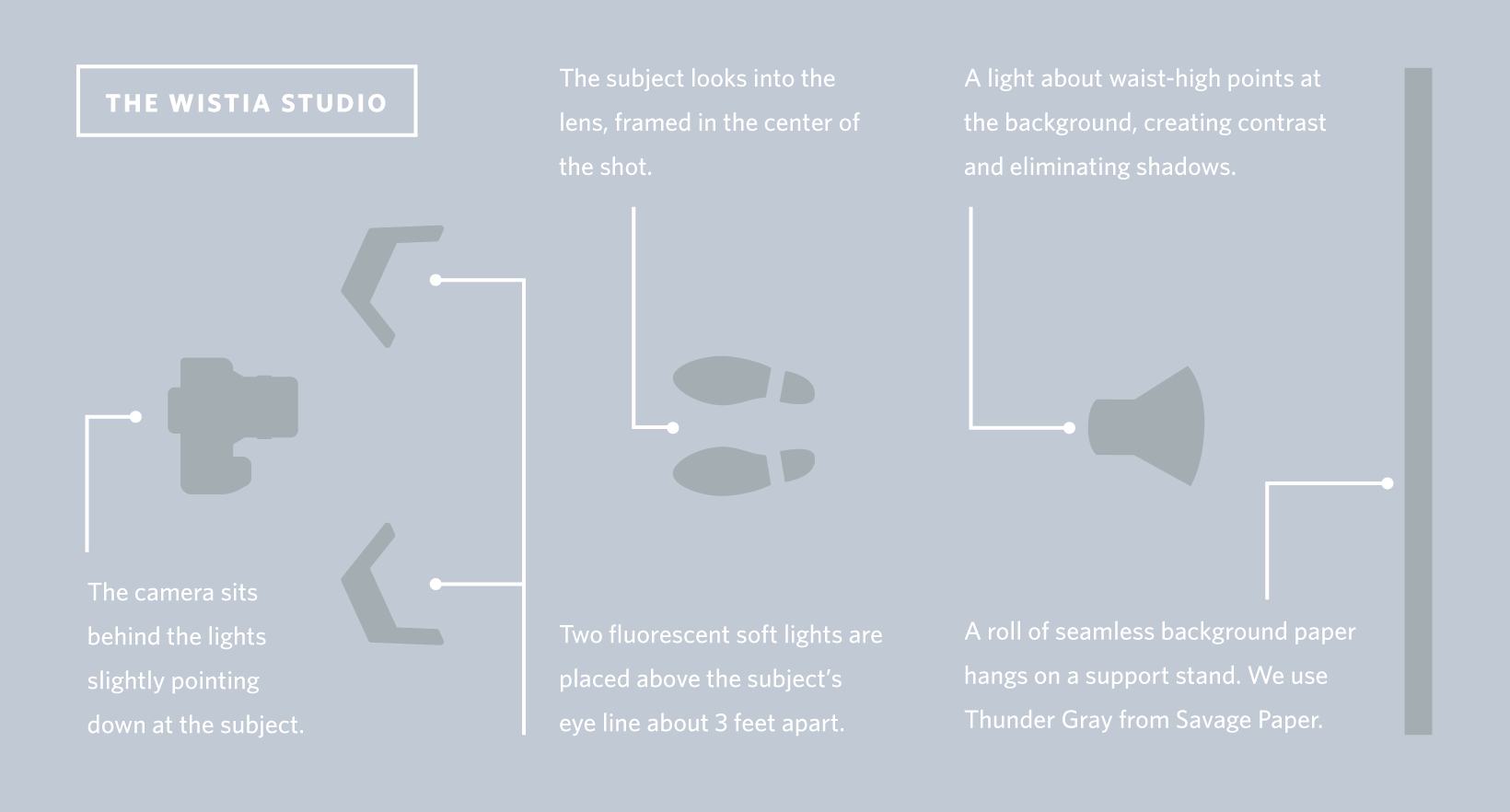
When filming indoors, avoid overhead lighting. Windows are a good natural light source. - Use little or now shadow to create a more open and straightforward shot, this is best for business/marketing videos. See the figure below for an example of how you can create a balanced effect with no shadows.
- Here is an example of how to get the best shadow technique.
2. Use a Clean Background
- Choose your background wisely. Avoid a messy or distracting background.
- Use a solid coloured background, like a wall, bedsheet, or large sheet of backdrop paper. Stand several feet away from the backdrop to avoid casting shadows.
- Avoid filming with a window or another reflective surface in the background.
3. Prioritise Crisp, Clear Audio🎧
- Audio quality is more important than professional video quality. When things sound fuzzy, this will likely prompt viewers to stop the video within a few seconds.
- Be aware of any background noise that your microphone might pick up.
Speak clearly and confidently. - Avoid large rooms as they will create an echo effect.
4. Avoid Shaky Footage
- Try not to hold your camera at all, instead use a tripod, or set your camera on a sturdy surface.
- Once you have your camera set up, try not to move it unless you have to. Panning around detracts from the professional look of a video.
5. Understand the Rule of Thirds
- This is an essential principle of film composition. Imagine there’s a 3x3 grid laid over the field you are filming. Instead of placing your subject right in the middle of the shot, you should instead place your subject along one of the lines of the grid.

6. Use your Phone the Right Way
- Use the camera on the back of your phone. The front camera’s quality is not as good on most phones
- Record in landscape mode, this will give you footage that looks good on larger devices.🖼️
7. Work on Your Camera Presence
- The way you carry yourself on camera has an enormous impact on the quality of the video. Avoid appearing nervous, fidgety, or uncomfortable.
- Use calm, open body language. Stand up straight. Keep your shoulders, back, and muscles relaxed. Avoid crossing your arms.
- Make sure to show off that amazing smile at the beginning of your video!
- Talk clearly, speak a bit slowly, and pronounce every word.
- Practice, practice, practice.
8. Plan your Videos in Advance
- Take the time to prepare. You will save time and appear more professional.
- It is best to write down a script. Avoid rambling videos, and keep it as brief as possible.
The more professional your Teaser Video looks, the easier it will be to match you up with the perfect student. With these tips, you will be able to dramatically improve the overal quality of your Teaser Video, and make a perfect first impression.
Click here to see a fantastic example of a Tutor Teaser video
